Command Line Interfaces
Some Text Editors
Defining and Describing Command-Line Interfaces
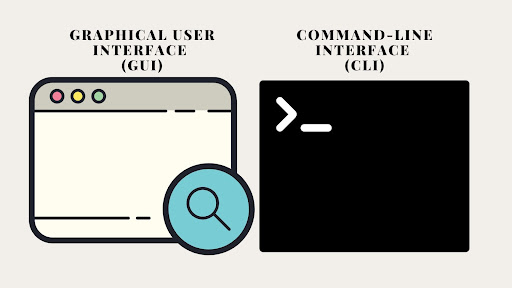
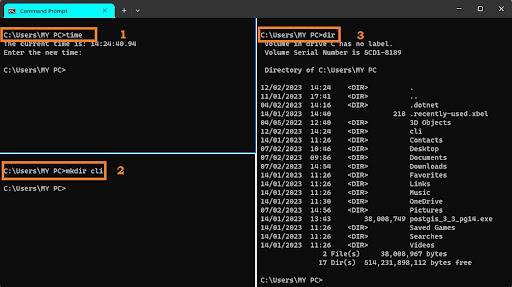
*In innovation and startup contexts, a command-line interface (CLI) is a text-based way for builders, operators, and power users to control software and infrastructure through typed commands in a terminal, often enabling faster, more scriptable workflows than clicking through a GUI.
[319x38]
[vp9nur]
[a960bg]
A CLI applies whenever a user interacts with an operating system, developer tool, or cloud/SaaS product by typing commands into a shell or terminal, rather than using graphical menus and buttons.
[319x38]
[vp9nur]
[8i27qu]
[a960bg]
It does not cover voice interfaces, chatbots, or generic “text input fields” inside a GUI; what matters is that commands are issued as text and interpreted by a program such as Bash, zsh, or PowerShell.
[319x38]
[vp9nur]
[8i27qu]
Innovation consultants care because CLIs shape developer adoption, automation capability, DX (developer experience), and ops productivity—factors that directly affect a startup’s shipping speed, onboarding friction, and ability to integrate into modern toolchains.
[vp9nur]
[tq67yo]
[a960bg]
Disambiguation
Primary sense — the innovation-consulting sense
A command-line interface (CLI) is a text-based interface that lets users interact with an operating system or software by typing commands into a terminal or console, typically to gain faster, more precise, and scriptable control than graphical interfaces allow.
[319x38]
[vp9nur]
[q31h80]
[a960bg]
Other senses
1. Network and device-administration CLI
A command-line interface for network/industrial devices is a text-based console used to configure and manage hardware such as routers, switches, firewalls, and automation controllers, usually accessed locally or remotely over SSH or (historically) Telnet.
[f57ri3]
- Network CLIs expose low-level configuration commands—configuring interfaces, routing policies, VLANs, and security rules—that are often not available or not as complete in any accompanying web UI. [f57ri3]
- Access is commonly provided over Secure Shell (SSH), which encrypts communications; Telnet is considered insecure and is generally disabled in modern practice. [f57ri3]
- For innovation work, this sense matters when designing products for DevOps, infrastructure, or industrial automation markets, where CLI access and command parity with GUI can be a key adoption requirement. [f57ri3]
Etymology and Origin
- In innovation and startup discourse, the term has been revitalized by the recent “CLI wave,” where SaaS and API-first products intentionally launch developer-focused CLIs (e.g., GitHub CLI, Stripe CLI) as first-class interfaces alongside—or even before—Web UIs, a trend highlighted in product-management commentary on “why CLIs suddenly matter again.” [tq67yo] [a960bg]
Adjacent Vocabulary
- Synonyms
- Antonyms
- Voice user interface (VUI) – Command via spoken language rather than typed text; similar in being “command-based” but different modality and tooling. [q31h80]
- Adjacent terms
- Developer Experience – Overall experience developers have when using a product, where CLIs often play a central role in speed and automation. [vp9nur] [tq67yo] [a960bg]
- Infrastructure as Code – Managing infrastructure through code and scripts, heavily dependent on CLIs for applying and validating changes. [319x38] [q31h80] [a960bg]
Usage in Practice
- Product-management commentary on the current “CLI wave” notes: “A Command Line Interface, or CLI, is one of the oldest and most fundamental ways humans interact with computers… CLIs predate pretty much everything we think of as ‘modern’ product design.” [tq67yo]
- The same source frames the product value of modern service CLIs: tools like GitHub CLI, Stripe CLI, and Google Workspace CLI “turn services you’d normally click through into something scriptable and composable.” [tq67yo]
- GitHub’s own description emphasizes developer control: “A CLI is a text-based interface that allows developers to interact with software and operating systems by typing commands into a terminal or console.” [a960bg]
- A developer-education article aimed at career switchers explains why startups still bet on CLIs: “a command-line interface offers programmers and developers faster and more powerful control of the computer” and “allows a programmer to access commands that are inaccessible through a GUI.” [vp9nur]
- A short video introduction for new developers highlights adoption dynamics: the command-line interface “is just another way to control your computer, but it's sometimes more flexible, faster, and even sometimes is the only option… some tools and systems only can be accessed through the command line interface.” [6vmb99]
- An operating-systems teaching slide defines the core interaction: “a Command Line Interface (or a shell) is a program that lets you interact with the Operating System via the keyboard.” [8i27qu]
- A technical explainer for IT and industrial automation stresses operational value: CLI is “a text-based interface used to configure and manage operating systems or network devices… Unlike Graphical User Interfaces (GUIs), CLI provides direct control, faster execution, and scripting capabilities for automation.” [f57ri3]
Common Misuses
- Calling any terminal window a “CLI” even when it only shows logs or output.
- Referring to a chatbot or LLM prompt as a “command-line interface” because users type text.
- Marketing a simple configuration text box as a “CLI” to sound developer-friendly.
- Using “CLI” interchangeably with “API” when pitching a product to developers.